
Bulk Enrollment Form [Report - Site Version]

This report contains new enrollment, income and infant forms for each participant each year.
While the CACFP regulations require that information on the enrollment form is updated yearly, some state agencies allow all participants to be listed on one report with a spot for parents to update information. That report is called our Annual Re-Enrollment Report. Providers or centers should check with their sponsor (and sponsors should check with their state agency) about whether they should re-collect forms in their entirety or an annual re-enrollment report is sufficient.

- Click on Reports from the main site dashboard.

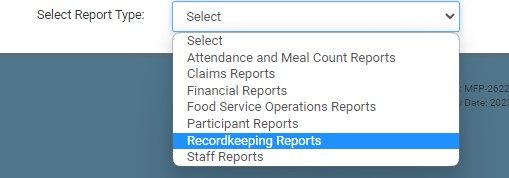
- Select the category for Recordkeeping Reports.
- Scroll down to the Enrollment & Income Forms subcategory.
- Click the hyperlink for the report labeled Bulk Enrollment Form Report.
- Make the report selections:
- All Active Participants
- Both - will include participants with a missing, expired or expiring income OR enrollment form
- Missing, expired or expiring enrollment form
- Missing, expired or expiring income form
- Click Run Report button to generate a hyperlink.
- Click on the Download Report hyperlink to download the report as a PDF.


