
Meal Count Entry [Setting]

This setting controls how you display the attendance and meal count screens.

To use this setting:
- Login as a sponsor admin user and click on Site Details from the main site dashboard.

- Find the dropdown labeled Meal Count Entry under Required Site Information.
- Select from:
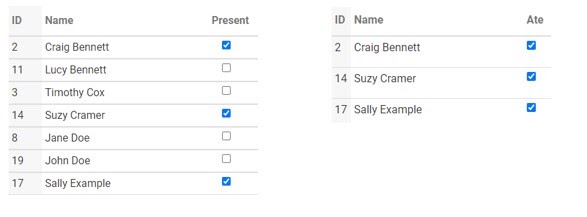
- Attendance and Meal Counts on Separate Screens: This option will have you taking attendance and meal counts separately.
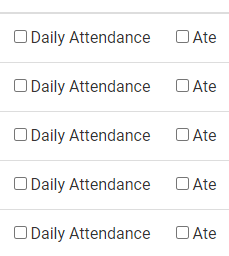
- Attendance and Meal Counts on the Same Screen: This option will have you taking attendance and meal counts on the same screen. Please note that is is not available with In/Out Times.
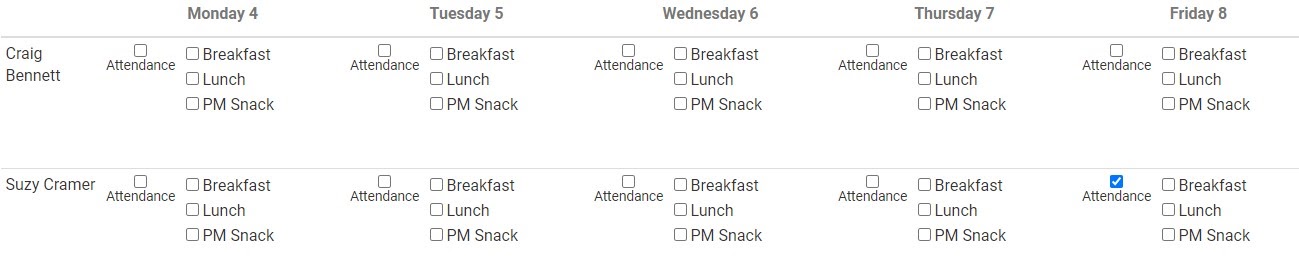
- Weekly Entry by Roster: This option has you entering weekly attendance and meal counts by roster (classroom) from your paper documentation.
- Monthly Entry by Name: This option has you entering monthly attendance and meal counts by name from your paper documentation.

- Scroll to the top or bottom of the page and click the green Save button.