
Daily Attendance Method [Setting]

This setting controls how attendance is entered. Attendance records are a requirement of the CACFP.

To use this setting:
- Login as a sponsor admin user and click on Site Details from the main site dashboard.

- Find the dropdown labeled Daily Attendance Method under Required Site Information.
- Select from:
- Present means that sites are marking if a child or adult day care client was present at all during the day. Daily attendance need only be marked once per day. The screen for present attendance will look like this:

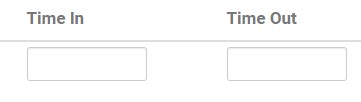
- In/Out Times requires that sites record arrival and departure times. The screen for in/out times will look like this:
- Scroll to the top or bottom of the page and click the green Save button.
Typically, centers or providers are only required to mark if the
participant was in attendance that day. However, some centers or
providers need or want to take attendance with an arrival time and
departure time.
participant was in attendance that day. However, some centers or
providers need or want to take attendance with an arrival time and
departure time.