
Reimbursements by Calendar Year (Sponsor-Level)

The IRS considers income from the CACFP as taxable. This report will tell you how much money you have received in CACFP reimbursements over the calendar year so that you can file accurate taxes. CACFP reimbursements should be included on IRS Form 1040 Schedule C in Part I.
NOTE: the CACFP works on a reimbursement basis. This means that the payments made during a calendar year do not line up with the meals served that year. For example, meals served in December are paid in January.
When the report matches a payment to a calendar month, this is what we do:
- First, we see if the sponsor marked the claim as paid and provided a payment date. If they did, then we use that. If not, we go to step 2.
- Next we try and look to see if the claim was marked as submitted to the state. If it was, then we use the expected payment date from that state submission. If the claim was not included in a state submission or there was no expected payment date entered for that submission, then we move to step 3.
- If there is no payment date and there is expected payment date for a state submission, then we fall back to the month that the claim was created.

- Login at the sponsor level
- Click on the green tab for "Reports"

- From the dropdown menu of report categories, select Financial Reports.
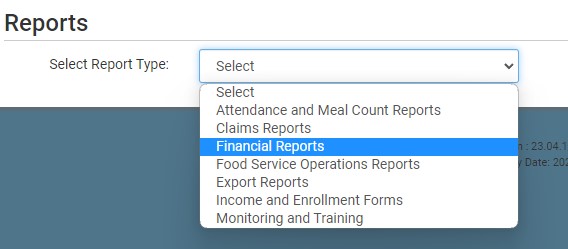
- Click on the hyperlink for the report labeled Reimbursements by Calendar Year.
- Select the calendar year
- Click the green Run Report button to generate a download link
- Click “Download Report” and your web browser will download the file into the folder you designate.
